The front page of my site is a Newton’s cradle made of glass balls, rendered with three.js. It looked a lot better in Chrome than in Firefox, and I couldn’t say exactly why. So I told Claude Code that it seemed to be downgrading stuff on Firefox, and to see what it could do.
The answer turned out to be one line inside three.js. Getting there was a loop: make a guess, then find the cheapest command that could prove it wrong.
Is it even on purpose?
“Firefox looks worse” has two possible causes. Either my code treats Firefox differently, or the browsers treat my code differently. Claude ruled out the first with one grep:
grep -n -i -E "firefox|gecko|moz|userAgent|isChrome|webkit|backdrop-filter|@supports|getContext\(|powerPreference|hardwareConcurrency|quality" main.js styles.css index.htmlNo user agent checks. Nothing was downgrading Firefox on purpose, so the difference had to come from the browsers.
Asking both browsers what they are
Next, Claude wrote a tiny probe page to get facts from each browser:
const g = document.createElement('canvas').getContext('webgl2', { antialias: true });
const info = g.getExtension('WEBGL_debug_renderer_info');
const report = {
  ua: navigator.userAgent,
  dpr: devicePixelRatio,
  cores: navigator.hardwareConcurrency,
  gl: g.getParameter(info.UNMASKED_RENDERER_WEBGL),
  samples: g.getParameter(g.SAMPLES),
};
fetch('/report', { method: 'POST', body: JSON.stringify(report) });
The fetch is the neat part. Headless browsers have no console you can easily read, so the page POSTs its results to a small local Python server that writes them to a file.
Claude ran Firefox through geckodriver, and Chromium headless from the command line:
chrome --headless=new --no-sandbox --enable-unsafe-swiftshader --user-data-dir=/tmp/prof http://127.0.0.1:8765/probe.htmlNothing obvious came back. Same pixel ratio, same core count, WebGL2 on both.
The wrong turn
Claude’s Firefox screenshots showed jagged strings and hard shadows, and my settings explained why: antialiasing off on desktop, BasicShadowMap, a 256px shadow map, 16×12 spheres. Claude raised all of them.
The site looked better. The strings stopped being jagged and the shadows cleaned up. But Firefox still didn’t look like Chrome, and in hindsight it couldn’t have: those settings were the same in every browser, so they could never explain a difference.
Comparing the pixels
So I cropped the same ball out of both browsers and sent the crops to Claude.
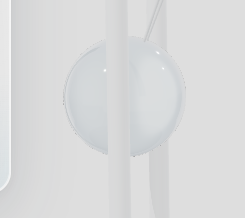
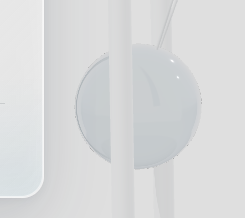
Chrome on top, Firefox below. This was never about edges. The ball itself was a different color, and that rules out a whole class of causes. Antialiasing and geometry change edges. Only lighting, materials or render targets change a ball’s color.
Following the color
Claude checked where the ball’s color comes from:
grep -n -E "Material\(|transmission|thickness|ior|envMap|environment|PMREM|clearcoat" main.jsconst ballMat = new THREE.MeshPhysicalMaterial({ transmission: 1, thickness: 2 * R, /* ... */ });transmission: 1 is the clue. A transmissive material has almost no color of its own. three.js renders the scene into an offscreen buffer, then looks at that buffer through the glass. If the browsers disagree about that buffer, you get different glass.
So Claude grepped the library for how the buffer gets created:
grep -n -E "EXT_color_buffer_(half_)?float|transmissionRenderTarget = new|samples:|REVISION = " three.module.js6:const REVISION = '160';
29835: _transmissionRenderTarget = new WebGLRenderTarget( 1, 1, {
29837: type: extensions.has( 'EXT_color_buffer_half_float' ) ? HalfFloatType : UnsignedByteType,If the extension exists, you get 16-bit floats. If not, you get 8 bits per channel, which can’t hold anything brighter than 1.0. It was the first thing in the whole hunt that could differ between browsers.
Proving it
Claude dumped the extensions from both browsers and diffed them:
const report = { ext: g.getSupportedExtensions().sort() };print("only CR", sorted(set(chrome['ext']) - set(firefox['ext'])))only CR ['EXT_clip_control', 'EXT_color_buffer_half_float', ...]There it is. Chrome has it. Firefox doesn’t, at least not on WebGL2 on my Linux machine.
Then the fun part. Was Firefox unable to do this, or just not advertising it? Claude built the framebuffer by hand to check:
g.getExtension('EXT_color_buffer_float');
const t = g.createTexture();
g.bindTexture(g.TEXTURE_2D, t);
g.texStorage2D(g.TEXTURE_2D, 4, g.RGBA16F, 64, 64);
const f = g.createFramebuffer();
g.bindFramebuffer(g.FRAMEBUFFER, f);
g.framebufferTexture2D(g.FRAMEBUFFER, g.COLOR_ATTACHMENT0, g.TEXTURE_2D, t, 0);
g.checkFramebufferStatus(g.FRAMEBUFFER) === g.FRAMEBUFFER_COMPLETE; // true in Firefox
Complete, with no GL errors. The feature was there the whole time. three.js was just asking for it by the wrong name.
No error, no warning. The fallback is a perfectly valid render path that happens to look worse.
The fix
A few lines in my own code, without touching the library:
const hasExtension = renderer.extensions.has;
renderer.extensions.has = name =>
  hasExtension(name) ||
  (name === 'EXT_color_buffer_half_float' && hasExtension('EXT_color_buffer_float'));
It has to run before the first render, because that’s when the buffer gets created.
Then I checked if this was worth a PR to three.js. It wasn’t: they already fixed it, somewhere between 0.161 and 0.165, with the same check. I was just on an old version. I’m staying on r160 with my workaround anyway, because upgrading could change how the whole scene looks.
What I took from it
Use the latest libraries when doing graphics stuff. Yes, I know I just said I’m staying on r160.
The checklist I’m keeping:
- Rule out the boring cause with one grep.
- Ask the browsers for facts instead of assuming.
- Check that a theory explains the difference, not only the symptom.
- Put two crops side by side and name what actually differs.
- Trace that one property back through the code, into the library if needed.
- Look for branches on capabilities. That’s where browsers split.
- Prove it with a diff, and fix it with a number to compare.