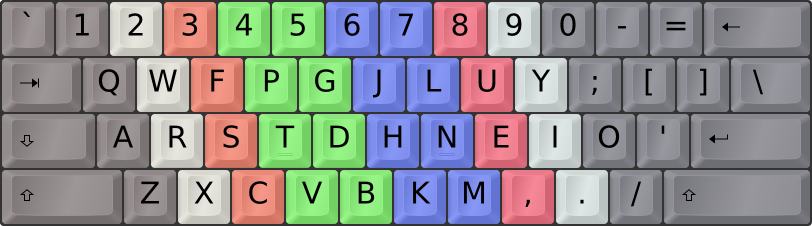
I learned Colemak because I wanted to be faster. I was on QWERTZ, the Swiss default, so there was nothing to lose by trying.
The pitch came down to two claims:
- You type faster.
- Everything is on the home row, so your fingers move less.
Both turned out to be true. I still quit after a year.
Installing it is the easy part. Most Linux distros ship it, and on Windows you download a build from colemak.com/Windows.
Learning it
The first hour is bad. Your fingers have years of habits, and they keep hitting the wrong keys with total confidence. Then it clicks.
2–3 days in, I was at 120 WPM, about 20 over my old speed. The home row thing is real: you type whole words without moving your hands.
The strange part was having two layouts in my head. They live in different places, and you can sort of select which set of muscle memory you want. I could still type QWERTZ, just not as fast.
I haven’t touched Colemak in 3 years, but it’s probably still in there. I think I could pick it back up in an afternoon. It’s like piano, your hands remember the shapes. Maybe that’s why they call them keyboards.
Why I quit
The layout was never the problem. Everything around it was.
Keybinds. Ctrl+C, Ctrl+V and Ctrl+X stay where they are on QWERTY, which is a huge plus for Colemak. Ctrl+Z I had to relearn, but only because I came from QWERTZ. A lot of other shortcuts break, and vim turns into a mess, because everything assumes QWERTY.
There are fixes, like the vim-colemak plugin, but then you’re relearning keybinds too, which is just one more set of muscle memory. And remapping hits the same wall as the layout itself: your config isn’t there when you SSH into a box or sit down at someone else’s machine.
Portability. Most of the time you’re on the same one or two machines, both set up with Colemak, and it’s great. Then you borrow someone’s computer and you’re back on QWERTY, slower than if you’d never left. Your layout only exists where you installed it.
After a year, I stopped.
QWERTY US won
I ended up on QWERTY US, which I’d never really used before, and it’s my favorite of the three. The brackets are where they belong: [, ], {, }. Programming finally makes sense.
Colemak does what it promises. It’s just that everything else is built for, and uses, the standard one: QWERTY.
With more practice, I’m now faster than ever on QWERTY US. The layout does hold you back a bit, and the boost from Colemak is real. But you can get very fast on QWERTY too. Faster than you need, anyway.