I switched my smart home from Home Assistant to just Zigbee2MQTT. No Home Assistant anymore, only Z2M, the MQTT broker it needs, and Z2M’s own web frontend. And the frontend is honestly beautiful now.
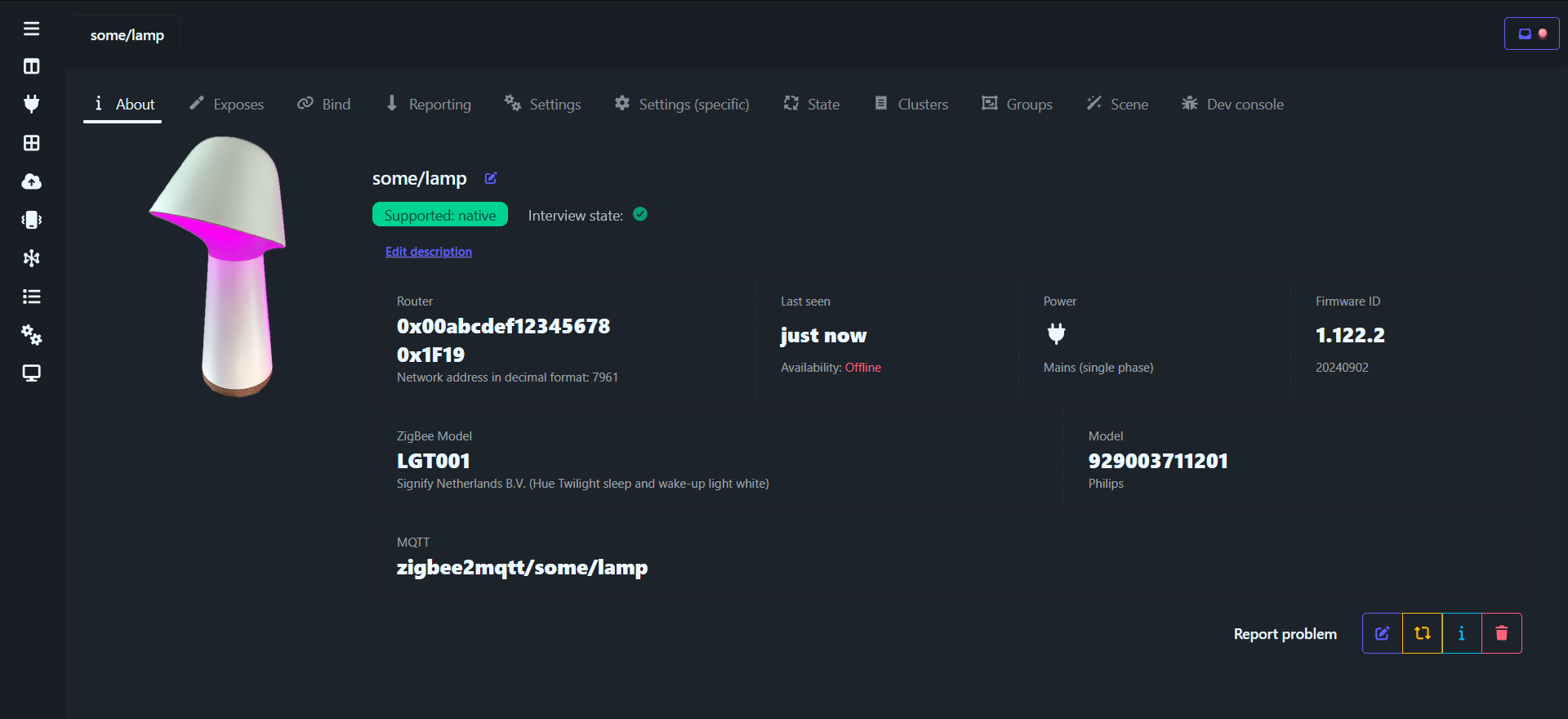
Not my lamp. This is WindFront, Z2M’s new frontend. Screenshot from the project’s repo.
It does like 90% of what I wanted Home Assistant to do for me. The one thing missing was history.
Home Assistant was already using Zigbee2MQTT
In my setup, Home Assistant never really talked to my Zigbee devices. Zigbee2MQTT did, running as an add-on. Z2M sent everything over MQTT and Home Assistant picked it up from there. (Home Assistant also has its own Zigbee integration, ZHA, but I was on Z2M.)
So Z2M was doing the actual work the whole time: talking to the Zigbee stick, knowing what every device is, turning a button press into a message. Home Assistant sat on top of it and drew the dashboard. Which made me wonder why it’s so big.
So many updates
Home Assistant puts out a release every month, with patch releases in between. On Home Assistant OS you also get OS updates, Supervisor updates, and updates for every add-on. There was pretty much always something with an update badge on it. I’m not the only one, there’s a whole forum thread about the pace of development.
I get why it’s big. It wants to support every smart home brand out there, plus automations, voice, energy dashboards, and it records every state change in your house. The VM wants at least 2 cores, 2 GB of RAM and 32 GB of storage. That’s fine for what it does, but I was mostly just looking at my lights and sensors and turning stuff on and off.
I do like how they ship it though. You can get a VM image, a Docker container or their own hardware. In 2025 they deprecated the Core and Supervised installs, so now it’s the OS image or the container, which is probably the right call. But either way you’re running all of Home Assistant, and I wanted something minimal.
What’s left
Just Zigbee2MQTT and an MQTT broker.
| Before | After | |
|---|---|---|
| Zigbee | Zigbee2MQTT, as an add-on | Zigbee2MQTT |
| MQTT broker | Mosquitto, as an add-on | Mosquitto |
| Dashboard | Home Assistant | Zigbee2MQTT’s frontend |
| Underneath | Home Assistant OS + Supervisor | whatever I want |
Z2M still gets updates of course, but it’s one thing to update, and the updates are actually about my devices.
The frontend got really good
I remembered the Z2M frontend as an admin page. You’d pair devices in it, rename them, mess with settings, and then go back to Home Assistant to actually use them.
Not anymore. Since 2.6.2 in late 2025, the default frontend is WindFront, a rewrite of the old one. It’s really nice to use. There’s a dashboard with all my sensors and switches, and I can dim and recolor my lights right there. That’s all I really wanted from Home Assistant in the first place.
If you prefer the old one, you can still switch back by setting the frontend package to zigbee2mqtt-frontend.
MQTT is the best part
What I ended up liking the most is MQTT itself.
It was there with Home Assistant too, Z2M always talked to it. I just never used it directly, because I mostly used Home Assistant through the dashboard.
Now it’s how I do everything, and it’s great. With Z2M it’s basically JSON over a stream. Every device has a topic, and whenever something changes, Z2M publishes the new state there as JSON. You subscribe to the topics you want, and wildcards let you grab a bunch at once. This shows everything in the house:
mosquitto_sub -v -t 'zigbee2mqtt/#'zigbee2mqtt/hallway_motion {"battery":100,"illuminance":12,"occupancy":true,"linkquality":87}To control something, you publish JSON to its /set topic:
mosquitto_pub -t 'zigbee2mqtt/hallway_light/set' -m '{"state":"ON","brightness":120}'You don’t need an API key or an SDK for any of this. If it can talk MQTT, it can talk to my smart home.
Automations
The big reason most people run Home Assistant is automations, so that’s the one thing I had to redo myself.
With MQTT that was easy. An automation is just a little script that listens on one topic and publishes to another, for example:
import json
import paho.mqtt.client as mqtt

def on_message(client, userdata, msg):
    if json.loads(msg.payload).get("occupancy"):
        client.publish("zigbee2mqtt/hallway_light/set", json.dumps({"state": "ON"}))

client = mqtt.Client(mqtt.CallbackAPIVersion.VERSION2)
client.on_message = on_message
client.connect("localhost")
client.subscribe("zigbee2mqtt/hallway_motion")
client.loop_forever()
Since it’s just JSON and readable topic names, AI is really good at writing these. I tell it what I want and which topics to use, and I get a one-off script back. When something doesn’t work, I run mosquitto_sub and look at what the script is seeing.
History
The one thing Home Assistant had that Z2M doesn’t is history. Its recorder saves every state change to a database, 10 days by default, so you can see when the door last opened or what the temperature was this morning.
Z2M only knows the current state. The frontend shows what a value is right now, and that’s it. I couldn’t find a history view anywhere. Maybe someone made one in the meantime, but I didn’t feel like waiting.
So I forked the frontend locally and had Qwen3.8-27B add it, on my 3090 with llama.cpp (with MTP it does up to 60+ tokens a second now). Now when I hover over a property, I see when it changed and what it was before.
I didn’t need a database of my whole house. I just wanted to see when something last changed, on the page I already use.
Takeaways
- If you only use Home Assistant as a dashboard for Zigbee stuff, Z2M’s own frontend might be enough.
- MQTT is great. Automations are a few lines of script, and AI writes them easily.
- All those Home Assistant updates are the price of it doing everything. Fine if you use everything, I didn’t.
- Missing a feature in an open source frontend? Fork it and have a model add it. A local 27B one does the job.