I bought a cheap Bluetooth e-paper tag off AliExpress: 2.9 inches, black, white and red, no app in the box I could be bothered with. On Bluetooth it shows up as NEMR followed by eight digits. When I searched for that, I found nothing. So this post is mostly here so the next person who types “NEMR” into a search bar lands somewhere useful.
Short version: it’s a Gicisky / PICKSMART electronic shelf label. It takes images over plain BLE with no pairing, and the 2.9” model wants a slightly different image format than the existing tools assume. It now hangs on my door and redraws itself every few minutes.

What the tag calls itself
This is the part that’s thin on the internet, so here it is up front.
| Bluetooth name | PICKSMART for a few seconds after power-up, then NEMR + 8 digits (e.g. NEMR12345678) |
| GATT device name | PICKSMART |
| Address | FF:FF:12:34:56:78 for NEMR12345678, derived from the barcode number: NEMRxxyyzzkk → FF:FF:xx:yy:zz:kk |
| Brand | Gicisky / PICKSMART, manufacturer ID 0x5053 (ASCII “PS”) |
| Screen | 2.9”, 296×128, black/white/red, panel maker code “EPA-1” |
| Chip | Telink (it exposes Telink’s OTA service); exact family not confirmed |
| Firmware / HW version | 0x81 / 0x01 |
| TX power | +3 dBm |
| Battery | two coin cells in parallel, reports 2.9 V |
| Radio | Bluetooth Low Energy only, no Wi-Fi, no NFC |
If your desktop’s Bluetooth list shows a PICKSMART that turns into NEMR… after a moment, it’s this family. Don’t click it in the list. The OS tries to pair, fails, and can leave it half-connected. A connected tag stops advertising, so nothing else can find it until you run bluetoothctl disconnect FF:FF:….
Decoding the advertisement
The tag broadcasts five bytes of manufacturer data under ID 0x5053. Mine are 33 1d 81 01 40:
| Byte | Value | Meaning |
|---|---|---|
| 0 | 0x33 | Screen parameters (see below) |
| 1 | 0x1d = 29 | Battery voltage ×10 → 2.9 V |
| 2 | 0x81 | Firmware version |
| 3 | 0x01 | Hardware version |
| 4 | 0x40 | Device type, high byte |
The screen byte packs everything you need to pick an image format. 0x33 = 001 10 01 1:
| Bits | Value | Meaning |
|---|---|---|
| 7–5 | 001 | 128×296 (000 = 212×104, 010 = 400×300, 011 = 640×384) |
| 4–3 | 10 | EPA-1 panel (00 TFT, 01 EPA) |
| 2–1 | 01 | Black/white/red (00 BW, 10 BW + yellow) |
| 0 | 1 | Single mirror (0 = double mirror) |
So you can read the battery without connecting. My sign uses that to draw its own battery icon.
Getting anything on the screen
A web search turned up fpoli/gicisky-tag, a Python writer for these tags whose README mentions the PICKSMART → NEMR rename. That was the first real confirmation of what I had. It didn’t work out of the box, for three reasons:
- It’s written for the 2.1” 250×122 tag. Mine is 296×128.
- It pins
bleak<0.23, which needs Python ≤ 3.12. My system Python was newer, so it ran underuvwith 3.12. - BlueZ forgets the tag. On Linux you can’t connect by address alone. BlueZ only connects to devices it has seen in a recent scan. And because I’d clicked the tag in the system Bluetooth list, it was half-connected and not advertising at all, so scans didn’t find it either.
I got past the last one by connecting through the existing BlueZ device path (/org/bluez/hci0/dev_FF_FF_…) instead of scanning. It also replaced the upstream transfer loop, which hung, with a short sender of its own. Then the tag accepted its first image.
The image format, by trial and error
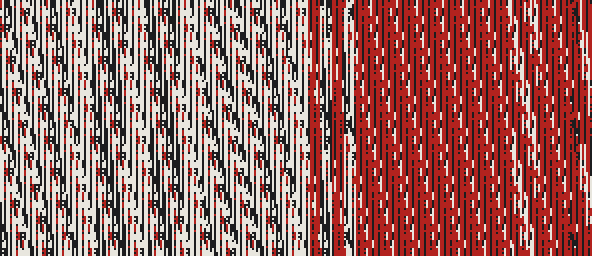
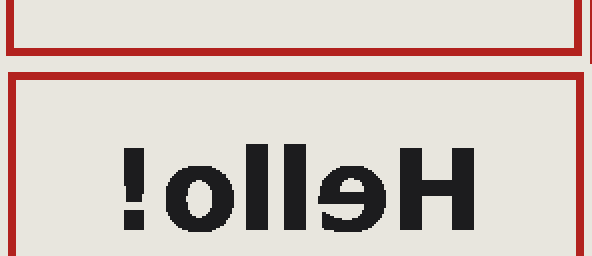
“Accepted” didn’t mean “correct”. Here’s what the tag actually drew. These are simulations: I fed the exact bytes from each attempt through the tag’s decoding.
Attempt 1: per-line 0x75 records, as the 2.1” tool sends them. The 2.1” format wraps every line in a 7-byte header. The 2.9” tag doesn’t parse those headers, it just draws them as pixels. That’s 56 extra bits per line, so every line starts a bit further along than the last. The result was a diagonal smear.
Attempt 2: raw bits, but with a 4-byte length prefix. Straight now, but mirrored, and everything shifted 32 pixels so the bottom of the red box came back out at the top like a marquee. Those 32 pixels were the length prefix, drawn as image data. The mirroring came from an extra flip copied over from the 2.1” code.
Attempt 3: raw packed bits, nothing else. Perfect.

So for the 2.9” 296×128 BWR tag:
- No per-line
0x75headers and no length prefix. Just bits. - Black/white plane first, then the red plane. In the BW plane 1 = white. In the red plane 1 = red.
- Start from a landscape 296×128 image and rotate it 90°, so the stream is 296 lines of 128 px (16 bytes each).
- 2 × 4736 = 9472 bytes, 40 blocks of 240 bytes.
import numpy as np
# white, red: 128×296 boolean arrays (True = white pixel / red pixel)
data = np.packbits(np.rot90(white)).tobytes() + np.packbits(np.rot90(red)).tobytes()
If the image has no red at all, you can send only the BW plane (4736 bytes). The tag takes it and the transfer time halves.
The protocol
Everything lives in one service, fef0. Commands go to fef1, image blocks to fef2, and the tag answers with notifications on fef1. No pairing, no encryption, no PIN.
| Step | Write | Tag replies |
|---|---|---|
| Ask block size | 01 → fef1 | 01 <u16 LE> (mine: 244, so 240 data bytes per block) |
| Announce image | 02 <length u32 LE> 00 → fef1 | 02 00 = OK |
| Start | 03 → fef1 | 05 00 <block index u32 LE> |
| Send block | <index u32 LE> <≤240 bytes> → fef2 | 05 00 <next index>, … finally 05 08 = done |
The tag drives the transfer: it asks for each block by index, and you answer. The whole sender fits in a screenful of bleak:
REQ = "0000fef1-0000-1000-8000-00805f9b34fb"
IMG = "0000fef2-0000-1000-8000-00805f9b34fb"

async with BleakClient(dev) as c:
    q = asyncio.Queue()
    await c.start_notify(REQ, lambda _, d: q.put_nowait(bytes(d)))

    async def req(cmd):
        await c.write_gatt_char(REQ, bytes(cmd), response=True)
        return await asyncio.wait_for(q.get(), 10)

    block = int.from_bytes((await req([0x01]))[1:3], "little") - 4
    await req([0x02, *len(data).to_bytes(4, "little"), 0x00])
    r = await req([0x03])
    while r[:2] == b"\x05\x00":
        i = int.from_bytes(r[2:6], "little")
        chunk = data[i * block:(i + 1) * block]
        await c.write_gatt_char(IMG, i.to_bytes(4, "little") + chunk, response=False)
        r = await asyncio.wait_for(q.get(), 10)
    assert r[:2] == b"\x05\x08"  # done, tag starts refreshing
Full GATT table
For completeness, here’s a read-only dump of everything it exposes. The labels are the vendor’s own user-description strings.
| Service | Characteristic | Props | Label | Use |
|---|---|---|---|---|
1800 Generic Access | 2a00 | read | PICKSMART | |
2a01 | read | Appearance 00 00 | ||
2a04 | read | 25–50 ms interval, 10 s timeout | ||
1801 Generic Attribute | 2a05 | indicate | Service Changed | |
fef0 Image | fef1 | write, write-no-resp, notify | “ext control” | Commands |
fef2 | write, write-no-resp, notify | “write block” | Image blocks | |
fef3 | notify | Unused by the protocol | ||
00010203-0405-0607-0809-0a0b0c0d1912 Telink OTA | …0a0b0c0d2b12 | read, write-no-resp, notify | “OTAv1.0” | Firmware update |
Can it go faster?
My first idea was a clock in the corner that updates every minute, or even a slow 0.5 fps animation. No luck on stock firmware.
| Step | Time |
|---|---|
| Find tag (scan filtered to its address) | ~1.7 s |
| Connect | ~1.6–2.3 s |
| Transfer, BW + red (40 blocks) | ~5.4 s |
| Transfer, BW only (20 blocks) | ~2.7 s |
| Screen refresh | ~21 s |
The transfer isn’t the problem, the refresh is. The firmware always runs the full black/white/red waveform, even when there’s no red in the image or no red plane at all. Red particles are slow, and that’s physics.
Other things that wen’t nowhere:
- The “type” byte in the
02command. I hoped 1–3 would be a hidden fast mode. It turns out1is a QuickLZ compression flag: eigger/hass-gicisky and hass-ble-esl compress the payload and set it. On my tag, compressed uploads were accepted up to the start command, and then the tag never answered the first block. Probably a layout mismatch on the 2.9”. Not worth chasing, since it would save maybe a second of transfer. Types 2 and 3 just made the tag go quiet. - Partial refresh. Nobody has published a partial-update command for these tags. atc1441’s notes, three Home Assistant integrations and two Python drivers all use only
01/02/03/05. The display controller (SSD16xx family, judging by OpenEPaperLink’s “290 Gici BWR SSD” profile) can do 1–2 s black/white partial refreshes in hardware. The stock firmware just never uses them.
So a once-a-minute clock would spend about 40% of its life mid-flash. Real partial refresh means custom firmware, which I’m not doing yet (see below). I designed around it instead.
The door sign
Everything above became a small Python project:
tag.pydoes the transport: scan for the address, read the battery from the advertisement, upload, retry. BLE to these tags is flaky, so every attempt has a hard 60 s deadline, and a hung BlueZ connect gets abandoned instead of awaited.canvas.pyis a three-color drawing API: text that shrinks to fit, rectangles, pills, dashed rules, dither patterns for fake tints, a battery icon, weather icons and pixel-art stamps. No anti-aliasing, so the preview PNG matches the panel pixel for pixel.designs.pyholds the presets. Each has its own fields and a draw function.door.pyis the loop. It redraws every 5/10/15/30/60 minutes, aligned to the clock and started 25 s early, so the refresh lands on the slot.- A web panel lets me switch presets, edit fields, and paint or stamp pixel art on a free-drawing layer on top. Every edit saves immediately and shows up at the next redraw.
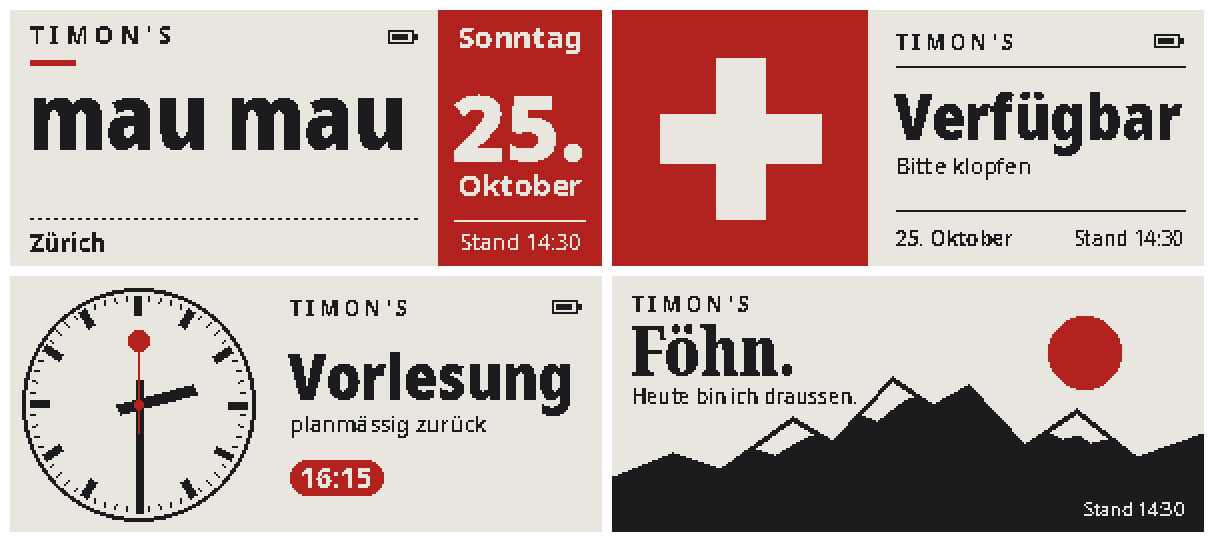
Three colors go further than you’d think, especially in Switzerland, where half the national iconography is already red and white. The station clock and the Swiss cross were obvious.
A few things I learned along the way:
- Don’t print an exact time on a sign that redraws every 15 minutes. By minute 14 it’s lying. The sign says “Stand 14:30” (“as of 14:30”) instead, which stays true.
- Battery percentage isn’t linear. Lithium coin cells sit at 2.9–3.0 V for most of their life, then fall off a cliff. The first icon mapped 2.6–3.0 V linearly, so a healthy 2.9 V cell showed ¾ empty. Now it uses a rough discharge curve: 2.9 V is about 85%, and 2.7 V is when to buy new cells.
- Scan, then draw, then upload. The battery reading comes from the scan, so drawing first meant every image showed the previous reading, and the very first one showed an empty battery.
- The drawing layer is separate from the design. Early on, painting on the canvas froze the clock text into the drawing. Now the design re-renders underneath on every redraw (time, date, weather), and my doodles sit on top unchanged.
- inotify beats polling.
watchfilesreacts to a hand-editedstatus.jsonin about 25 ms instead of up to 5 s. That matters less than it sounds when the panel takes 21 s anyway.
Security, briefly
Anyone within BLE range (10–30 m) can push an image to this tag. No pairing, no PIN, nothing. The Telink OTA service is open too, so it’s plausible that anyone can flash firmware onto it. I haven’t tested that. Retail shelf-label systems have had the same “change the price” class of bug (CVE-2022-45914).
The blast radius is small: no network, nothing it phones home to. The realistic abuse is a prank on my door, a bricked tag or a drained battery. I’m fine with that for a door sign.
Custom firmware, someday
- atc1441’s BLE flasher can OTA OpenEPaperLink firmware onto newer Telink Gicisky tags. One Home Assistant user flashed a 2.9” BWR this way: it failed at ~95% once, then worked with display type “290 Gici BWR SSD”.
- Nobody has published a stock firmware dump for these. Flash it and there’s no going back to the PICKSMART protocol.
- pvvx’s TLSR825x_OTA_Flash_Hacker could, on a TLSR825x, OTA a tiny image that reads the original firmware back over BLE. It’s untested on this tag and I haven’t confirmed the chip, so that’s a risk.
- The safe route is wired: TlsrComProg825x with a USB-UART adapter on the SWS pad reads the full 512 KB flash and can’t brick anything.
The plan if I ever do it: buy a second tag, open it, identify the chip, dump it over the wire, and only then flash. They’re cheap.
Links
- fpoli/gicisky-tag: Python writer (2.1” out of the box), has the vendor protocol doc in
docs/ - atc1441/ATC_GICISKY_ESL: protocol notes, web uploader, BLE flasher
- eigger/hass-gicisky: Home Assistant integration for stock tags
- RealPotatoe/gicisky-296-bwry: driver for the 2.9” BWRY (yellow) variant
- Home Assistant thread on Gicisky BLE ESLs
Takeaways
NEMR…on Bluetooth (PICKSMARTat boot) is a Gicisky ESL. The address isFF:FF:+ the 8 digits.- The 2.9” 296×128 BWR wants raw packed bits: rotate 90°, BW plane then red plane, no line headers, no length prefix.
- Stock firmware means ~21 s per refresh, full screen, every time. Design for that, don’t fight it.
- There’s no security at all. That’s fine for a door sign. Don’t put anything on it that matters.